How to Schedule Your LSAT Testing Time
For the 2026-2027 testing cycle, the vast majority of test takers will be scheduling a testing session at a Prometric test center through the Prometric ProScheduler tool. Therefore, test takers will be assigned a scheduling window based on the order in which they register for each administration. This assignment will be done on a “first register, first in line” basis for each LSAT administration.
This process will apply to all test takers, including those who are eligible for a Remote Testing Exception.
Once registered for a specific LSAT administration, test takers will be able to check their assigned scheduling day and time in the LSAT status tab in JD Services (opens in new browser window).
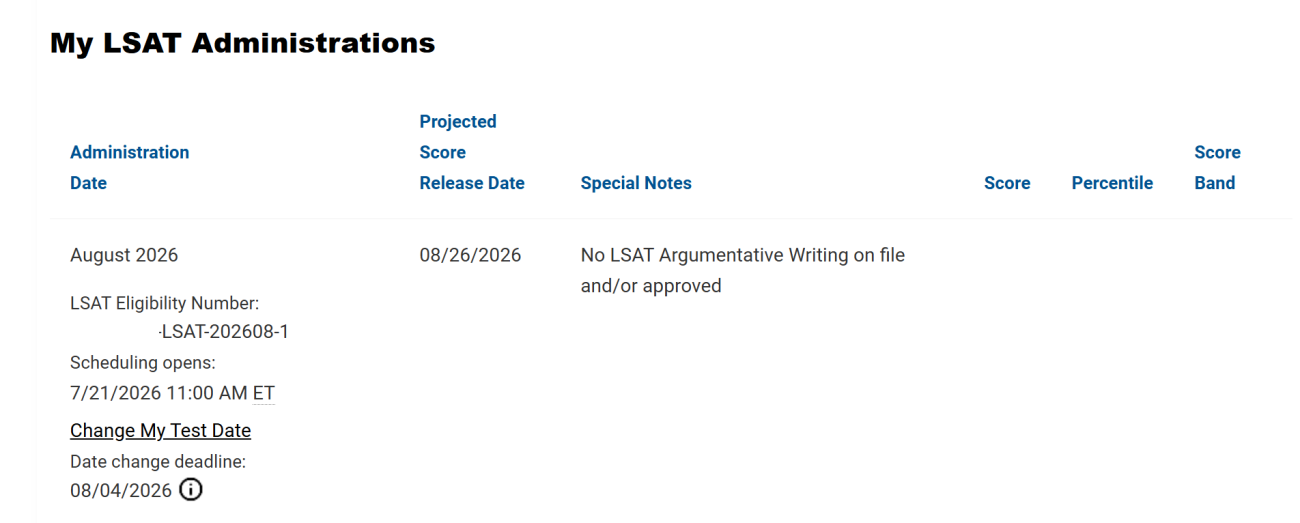
About one week prior to scheduling opening their LSAT administration, test takers will receive an email reminder that their scheduling window is coming up. On the day scheduling opens, test takers will receive an email and an SMS message informing them when their specific scheduling window will open. The email will provide instructions on how to schedule their testing session in the Prometric ProScheduler tool. Be sure to log in to JD Services and set your preferences to opt-in to receive SMS messages. Once the scheduling window opens, it will remain open until scheduling closes approximately one week before the start of the LSAT administration. Test takers will be able to select their preferred day and time, based upon availability at their preferred test center. Testing sessions will be available on a “first come, first served” basis, so be sure to plan accordingly. If test takers want to change their original testing appointment, they will be able to do so starting at 11 a.m. ET the day after scheduling opens for each LSAT administration. Test takers who receive a remote testing exception based on an approved testing accommodation or distance exception will also be assigned a scheduling window, but will only have the option to schedule a testing session on the Friday test day of the administration. Scheduling for remote testing sessions will end three days prior to the start of the LSAT administration.
Scheduling Options
From JD Services
Visit the LSAT Status page (opens in new browser window) of your account.
Follow the links to schedule within your eligible testing modality and window.
You will be redirected to Prometric’s ProScheduler tool.
Agree to Prometric’s Personal Data Privacy Disclosure & Consent form.
If you’re scheduling to take the LSAT in the online, remote-proctored environment, select your testing location time zone and preferred test date. If you’re scheduling to take the LSAT in person at a Prometric test center, enter your physical address and preferred test date.
Select your desired appointment time, validate your demographics, and confirm your appointment.
You’ll receive a confirmation email. Additionally, you can confirm the details of your testing appointment on the LSAT Status page (opens in new browser window) of JD Services. (Please note: Your testing appointment may not appear in your account immediately.)
Directly Through the ProScheduler Tool
Need help? Contact Prometric.
If you need help, please contact Prometric at 1.800.350.5517 (Monday through Friday, 8 a.m. to 8 p.m. ET).
If you have approved testing accommodations, including testing over multiple days, contact Prometric for scheduling help at 1.800.967.1139 and use option 4 (Monday through Friday, 8 a.m. to 6 p.m. ET).